
Applications
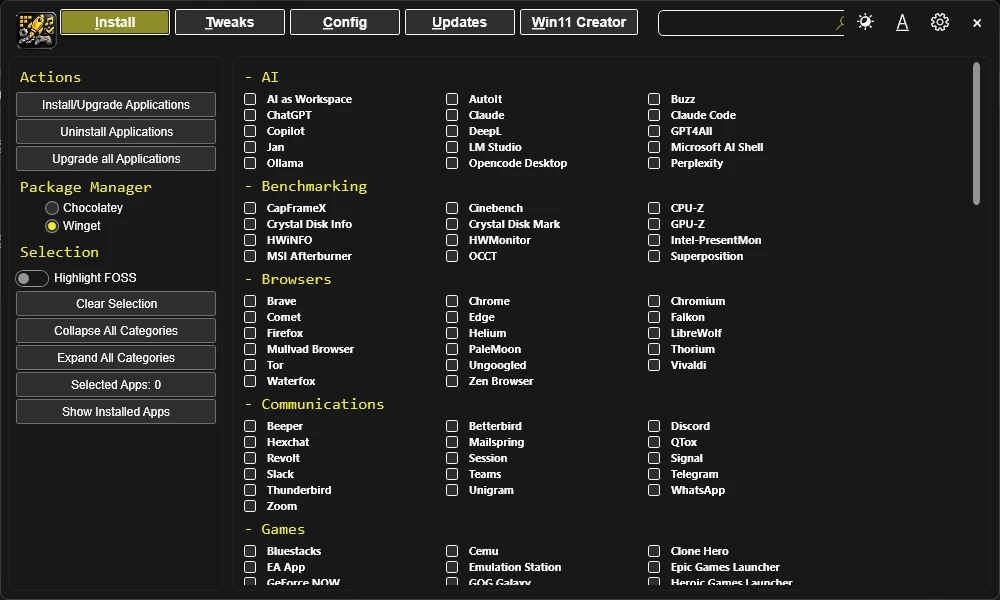
The Applications tab in Essentials allows you to install, upgrade, and uninstall programs using WinGet package manager. WinGet is Microsoft's official command-line package manager for Windows.
Installation & Updates
Choose the applications you want to install or upgrade.
- For programs not currently installed, this action will install them.
- For programs already installed, this action will update them to the latest version.
Click the Install/Upgrade Selected button to start the installation or upgrade process.
Upgrade All
Simply press the Upgrade All button.
This will upgrade all applicable programs that are installed without the need for individual selection.
Uninstall
Select the programs you wish to uninstall.
Click the Uninstall Selected button to remove the selected programs.
Get Installed
Click the Show Installed Apps button.
This scans for and selects installed applications supported by WinGet.
Clear Selection
Click the Clear Selection button.
This will unselect all checked programs.
Tip: If you have trouble finding an application, press Ctrl + F and search for its name. The list filters as you type.