
Features
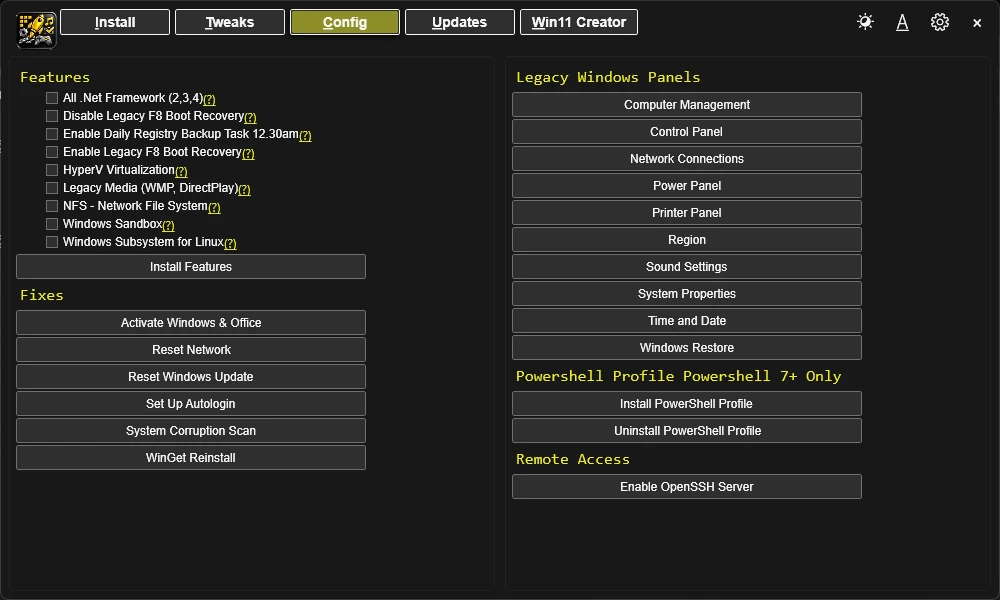
Use the Features and Fixes sections to install optional Windows components and run common repair tasks.
Windows Features
Install common Windows features by selecting the feature checkboxes and clicking Install Features.
All .NET Frameworks (2, 3, 4)
Install all .NET Framework versions for application compatibility.
Hyper-V Virtualization
Enable Microsoft's virtualization platform for running virtual machines.
Legacy Media (WMP, DirectPlay)
Install Windows Media Player and DirectPlay for legacy application support.
NFS - Network File System
Enable NFS protocol support for Unix/Linux network file sharing.
Enable Daily Registry Backup Task 12:30am
Schedule automatic daily registry backups for system recovery.
Enable Legacy F8 Boot Recovery
Restore the legacy F8 advanced boot options menu.
Disable Legacy F8 Boot Recovery
Remove the legacy F8 boot recovery option.
Windows Subsystem for Linux
Install WSL for running Linux distributions natively on Windows.
Windows Sandbox
Enable lightweight desktop environment for safely running applications.
Fixes
Use these one-click fixes for common system problems.
Activate Windows & Office
Activate Windows and Microsoft Office licenses.
Set Up Autologin
Configure automatic Windows login for your account.
Reset Windows Update
Reset Windows Update components to fix update issues.
Reset Network
Reset all network adapters and configurations.
System Corruption Scan
Scan and repair corrupted system files.
WinGet Reinstall
Reinstall WinGet package manager.
Remove Adobe Creative Cloud
Completely uninstall Adobe Creative Cloud applications.
Legacy Windows Panels
Open old-school Windows panels directly from Essentials. Available panels include:
Control Panel
Network Connections
Power Panel
Region
Sound Settings
System Properties
User Accounts
Remote Access
Enable SSH Server
Enable an OpenSSH server on your Windows machine for remote access.